


Upgrading your car stereo starts with one question: what will work with your vehicle? A larger screen can be appealing, but the right navigation system also needs to match your dashboard, original audio equipment and everyday requirements. This guide explains what to check before choosing a YEANAV car stereo.
1. Start with your vehicle, not the screen size
Begin with the make, model and year of your car. Then take a clear photo of the dashboard and original stereo. A product listed for your vehicle brand is a starting point; it does not establish compatibility with every model, trim level or factory audio system.
The dashboard opening, installation frame, wiring harness and original equipment can affect what is required. Tell our team whether your vehicle has a factory amplifier, reversing camera, steering-wheel controls or other integrated functions. Retaining those features may require additional interfaces or adapters.
Browse the YEANAV product catalog by vehicle brand, then confirm the specific fitment before ordering.
2. Understand Android stereos, CarPlay and Android Auto
An Android-based head unit and Android Auto are different things. An Android head unit runs its own operating system; Android Auto provides a phone-connected experience on a compatible display. An Android operating-system label alone does not confirm Android Auto support.
Apple CarPlay brings supported iPhone functions, including directions, calling, messaging and audio, to a compatible in-car display. Android Auto offers a driving-oriented interface for supported phone apps through a compatible car or aftermarket stereo. Phone, connection and app requirements must be checked for the intended setup.
When comparing YEANAV products, ask whether the exact configuration supports your phone and whether the connection is wired, wireless or both. Do not assume that every model has identical smartphone integration. See the official Apple CarPlay overview and Android Auto overview for platform information.
3. Compare the configuration you will actually receive
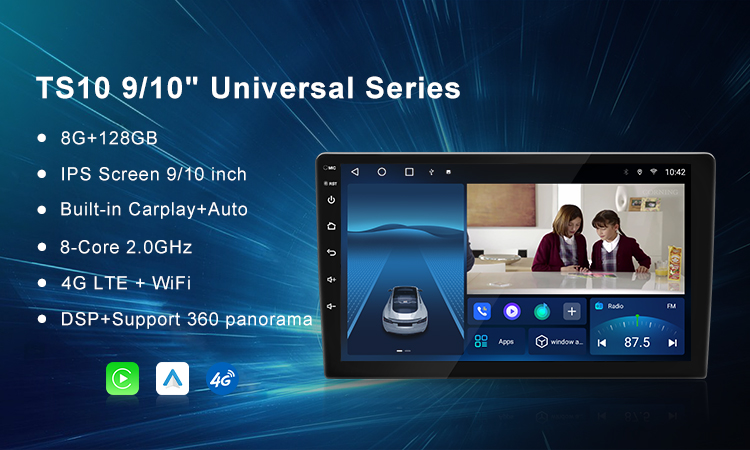
Products with similar appearances may have different processors, RAM, storage, display specifications and connectivity. Review the selected configuration rather than relying on the main promotional image alone.
- Screen: check dimensions, resolution, mounting position and whether the display obstructs controls or vents.
- RAM and storage: compare the stated memory configuration with the apps and files you plan to use. Storage capacity alone is not a measure of overall performance.
- Connectivity: confirm Bluetooth, Wi-Fi, USB and any mobile-data capability on the selected model. A SIM slot or a data connection should never be assumed from the product category.
- Audio and cameras: confirm the supported connections and compatibility with the equipment already in your car.
Where a product page displays a price range, the final quotation depends on the chosen configuration. Confirm the included frame, harness, adapters and other accessories, together with shipping and applicable taxes, before ordering.
4. Plan your navigation and installation setup
Ask which navigation apps the chosen product supports, how it obtains location information and which features require an internet connection. If offline navigation matters to you, check the map app, regional coverage and download requirements in advance.
Before installation, confirm the wiring requirements, camera connection and factory-audio interfaces. If you are unsure about your vehicle wiring or integrated systems, use a qualified installer. Complete pairing, app setup and route planning while parked; keep your attention on driving and follow local road rules.
5. Send YEANAV a useful fitment enquiry
A few details make it easier to discuss suitable options. Send:
- Your vehicle make, model, year and trim, if known.
- A dashboard photo and information about the original stereo.
- Your phone model and preferred smartphone connection.
- The product or configuration you are considering.
- Any factory amplifier, camera or controls you want to retain.
- Your delivery country so shipping can be discussed.
For support with an existing purchase, include your order number, product details and a clear description of the issue.
About YEANAV
YEANAV offers car stereos, navigation systems and related accessories through Guangzhou Yihang Electronic Technology Co., Ltd. in Guangzhou, China. Explore our company introduction or contact our team about vehicle fitment and OEM/ODM requirements.
Ready to check your upgrade?
Explore YEANAV products or send a fitment enquiry. You can also contact YEANAV on WhatsApp with your vehicle details.
Product features, accessories and compatibility vary by model and configuration. Platform references describe general functionality and do not imply certification or endorsement of a specific YEANAV product.